Situation on April 29, 2021 at 08:00 pm
Good evening to all,
On this Thursday evening, a new update following the computer attack that we have suffered.
The results of the investigation into the attack vector are becoming clearer and clearer, which is leading and will lead in the next few days to several changes in the use of UniLaSalle's digital services. So, after a first wave of password changes that took place over the last few days, we will soon activate a multi-factor authentication system on your user accounts (this is why, when you reset your password, the system asked you for an alternative phone number or email). We will come back to you on this subject, in a dedicated communication accompanied by the appropriate documentation, in the next 15 days. This will be a first step in tightening up the security rules.
On user accounts, we have also tightened up the login policies: several failed login attempts will automatically block the account. So we also spend time reactivating blocked student accounts.
As you saw yesterday, we were also hit by a wave of phishing mails. This wave has now subsided (or even stopped) as we have also stepped up our spam management strategies. If you are waiting for some emails that you do not receive, they have probably fallen into the "Junk" folder of your mailbox (right-clicking on valid emails and selecting the "Mark as legitimate" option will allow you to find them in your inbox).
According to the campuses, here is an update on the situation:
- Beauvais
- Our network segmentation project is almost complete, we will gradually reopen the network tomorrow (in particular to reopen the computer rooms for the start of the new academic year).
- Your entire J:/ disk is now available in your personal OneDrive space. As this attack is also a good way to bring change, OneDrive will definitely replace your J:/ drive (see FAQ below).
- The documentation centre portal and sphinx are operational
- Our network segmentation project is almost complete, we will gradually reopen the network tomorrow (in particular to reopen the computer rooms for the start of the new academic year).
- Rennes :
- The network is operational
- The network is operational
- Rouen :
- New sections of the network are reopened.
- The computer rooms with physical machines and thin clients should be operational by the end of the day tomorrow. The student wifi is also operational.
- New sections of the network are reopened.
We wish you a good evening and thank you again for your patience.
Situation on April 27, 2021 at 07:00 pm
Dear students,
As announced at the end of last week, we have reviewed all user accounts on all campuses. Many of you have had to change your password when logging in to the Office 365 portal (for a good and strong password, please refer to the FAQ at the bottom of the page).
Depending on the campus, here is an update on the current situation and the work in progress:
- Beauvais :
-
As the network is not operational, we have decided to completely revise our network typology (something complicated in production because it inevitably leads to major outages, so this is an opportunity). This work is well advanced and we will be able to gradually reopen the administrative network (in parallel with the computer room network). However, please do not connect your workstations to the wired network until we have indicated this.
- In parallel with the recovery of the file server, the entire J:/ network drive of each of you is being copied to your personal OneDrive space (while this copy - of "a few" gigabytes - is being made and your data recovered).
- The computers are still being scanned.
- A large part of the web services are operational (see table on the page)
- We are pursuing investigations into the origin (which is clear to us now) and deployment of the attack with cyber security experts from different agencies.
- The next big projects concern the print server and TeDi.
-
- Rennes :
- The administrative network is operational, with Internet access
- The web services (Scola, Moodle, documentation centre portal) are operational.
- Work in progress concerns the file server and the print server.
- The administrative network is operational, with Internet access
- Rouen :
- The servers dedicated to administrative activity are back in place (with an analysis carried out)
- Web services (Moodle, WebAurion, and the documentation centre portal) are accessible online.
- Part of the administrative network, where all the workstations have been scanned, has been restored.
- The next major projects concern the infrastructure dedicated to teaching.
- The servers dedicated to administrative activity are back in place (with an analysis carried out)
At the same time, all Office 365 tools remain fully operational.
As you can see, we are only putting services back into operation with an absolute guarantee of their current and future integrity. We apologise for any inconvenience this may cause to your activities.
Situation on April 23, 2021 at 11:00 pm
Dear students,
As agreed here is a news update following the cyber attack.
The restoration of the remaining services mentioned yesterday (Agora or Aurion, portal for documentation centres) went well during the day or is well under way (the data is there, and that is the most important thing).
In parallel with the restorations, we have conducted an investigation (the term is well chosen, as it is truly a scientific investigation) to trace the origin of the attack. This investigation has led us to new actions and in particular to carry out, this weekend, a verification of all the user accounts and service accounts in our directory.
The last date for changing a password, the length of time a password is valid, the requirement for a password to expire and other important properties will be checked. Depending on these factors, you may be asked to change your password (see FAQ below).
In order to work peacefully on this clean-up, we have decided, in agreement with the crisis management team (DG Group, Campus Management, General Secretariat, Directorate of Studies and Training, DCOM and DSITN), to cut off external access to the services hosted on the campuses throughout the weekend. The services that we have restored this weekend (Agora, Claroline, Moodle, etc.) will therefore be inaccessible from this evening until Monday morning. However, all Office 365 tools (email, Teams, OneDrive, etc...) and Internet access in the residences will remain accessible.
We wish you a good evening, a very good weekend, a disconnected weekend, and a good holiday (for those who are on holiday from this evening).
Situation on April 22, 2021 at 11:00 pm
For all campuses, access to Office 365 tools - your mailbox, Teams, OneDrive, intranet, etc. - has been available since early yesterday evening.
The file servers (the network sharing spaces - for example the J:/ on Beauvais) remain inaccessible for the moment, as does the TeDi remote virtual office (will not be back in service until the middle of next week at best). Mobility Online will be back tomorrow.
For the other tools and services you are accustomed to using, the situation may be different depending on the campus :
- For the Rennes campus: access to Scola and to the portal of the documentation centre are restored, as well as La Ruche (already yesterday) and the wifi should be functional on the campus ;
- For the Rouen campus: access to Aurion, Moodle, the documentation centre portal and Internet access via wifi could be back tomorrow ;
- For the Beauvais campus: access to Claroline is operational, Agora will be fully back in the next few hours. Internet access via wifilasalle is operational, the Bristol portal of the documentation centre should be back tomorrow ;
- For the Amiens campus, spared by the attack, everything is operational.
Situation on April 21, 2021 at 10:00 pm
Good news: our authentication brick is back up and running (even if it only works on one leg - we usually have 2 servers, we only brought up one so you can still log in).
This return of authentication comes with another piece of good news: you can once again access Office 365 tools (Mail, OneDrive, Teams, etc., etc.) via the https://portal.office.com portal. To use your email, we recommend that you use the webmail via the address https://outlook.office.com. You will notice, when you connect to these services, that you will no longer be redirected to the address https://fs.unilasalle.fr where you used to enter your password. This is quite normal, authentication is now directly integrated into the cloud (the address is https://login.microsoftonline.com)
Situation on April 21, 2021 at 5:30 pm
We are currently undergoing an important and rather serious computer attack (ransomware/ransomware attack with massive file encryption) targeting all the campuses (Beauvais, Rennes and Rouen are particularly affected), which forced us to cut all services.
At the moment, all the services hosted on our infrastructure are inaccessible (Agora, Claroline, Tedi, etc...) but you can still, for some of you, access to Office 365 tools (mail, teams, onedrive). This access is unfortunately only temporary and will probably expire within 24 hours if we do not reactivate our authentication (access to your email and tools via your UniLaSalle login and password).
Our priorities, in order, are currently to :
- Restore the authentication so that at least the access to Office 365 is operational for all as well as the unaffected services (Claroline, Moodle because hosted on Linux servers or hosted in the cloud). When the authentication is back, you will be invited to change your password
- Check all our servers to know if they are infected or not
- Restart uninfected servers
- Recover viable backups of infected services to restore them
- Revisit all PCs in labs and classrooms impacted by the virus to restore them to working order
The appropriate authorities are aware of our situation and we are working with security experts to restore the situation. Nevertheless, a return to normal operation of all functionalities will require several days of work and investigation.
We will keep you informed of the situation as it evolves. The access to the emails being complex, a message will be sent in the next hours by the MyUniLaSalle application with a link accessible on our website summarizing all the information. Nevertheless, do not hesitate to pass on the information to your fellow students.
Frequently asked questions
What is the impact on pedagogy and teaching?
As long as authentication is not restored, remote courses cannot function. Face-to-face courses can continue to take place as long as the content is accessible by your teachers. Thank you for your presence in class and for your understanding during this delicate period. The schedule will be updated as soon as the associated tools are restored (Agora, Aurion, Scola).
In Beauvais, will the TOEIC test be held on Thursday 22/04?
Yes, until further notice. This test will be held as originally scheduled.
In Beauvais, what is the situation for the exams that were to take place in the computer room tomorrow?
They are cancelled. Information will be communicated in due course by the pedagogical managers.
In Rouen, for the exams, please get in touch with your Director of Studies / Director of Training
In Rennes, the exams scheduled on La Ruche are maintained
How do I know if my password needs to be changed?
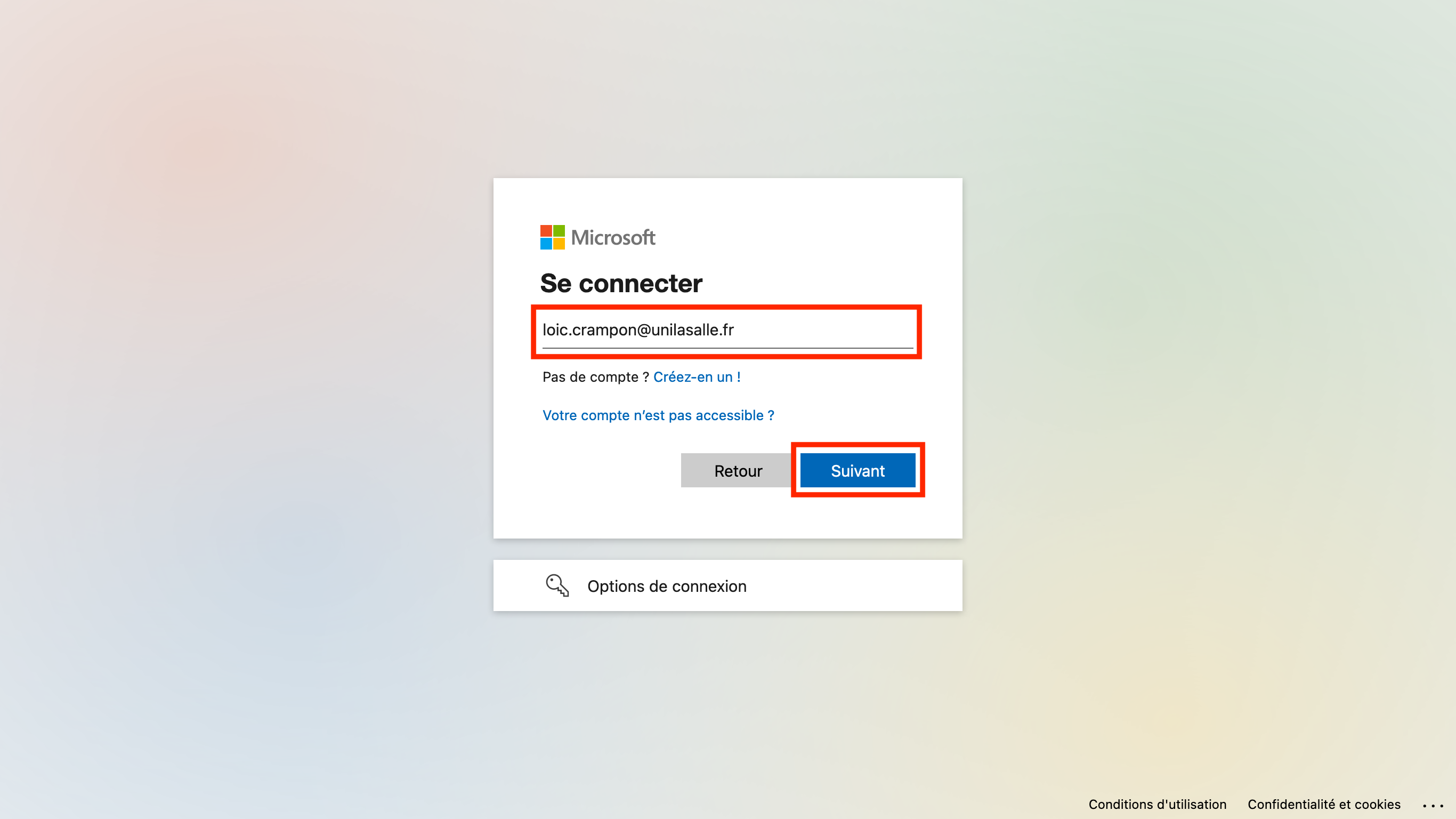
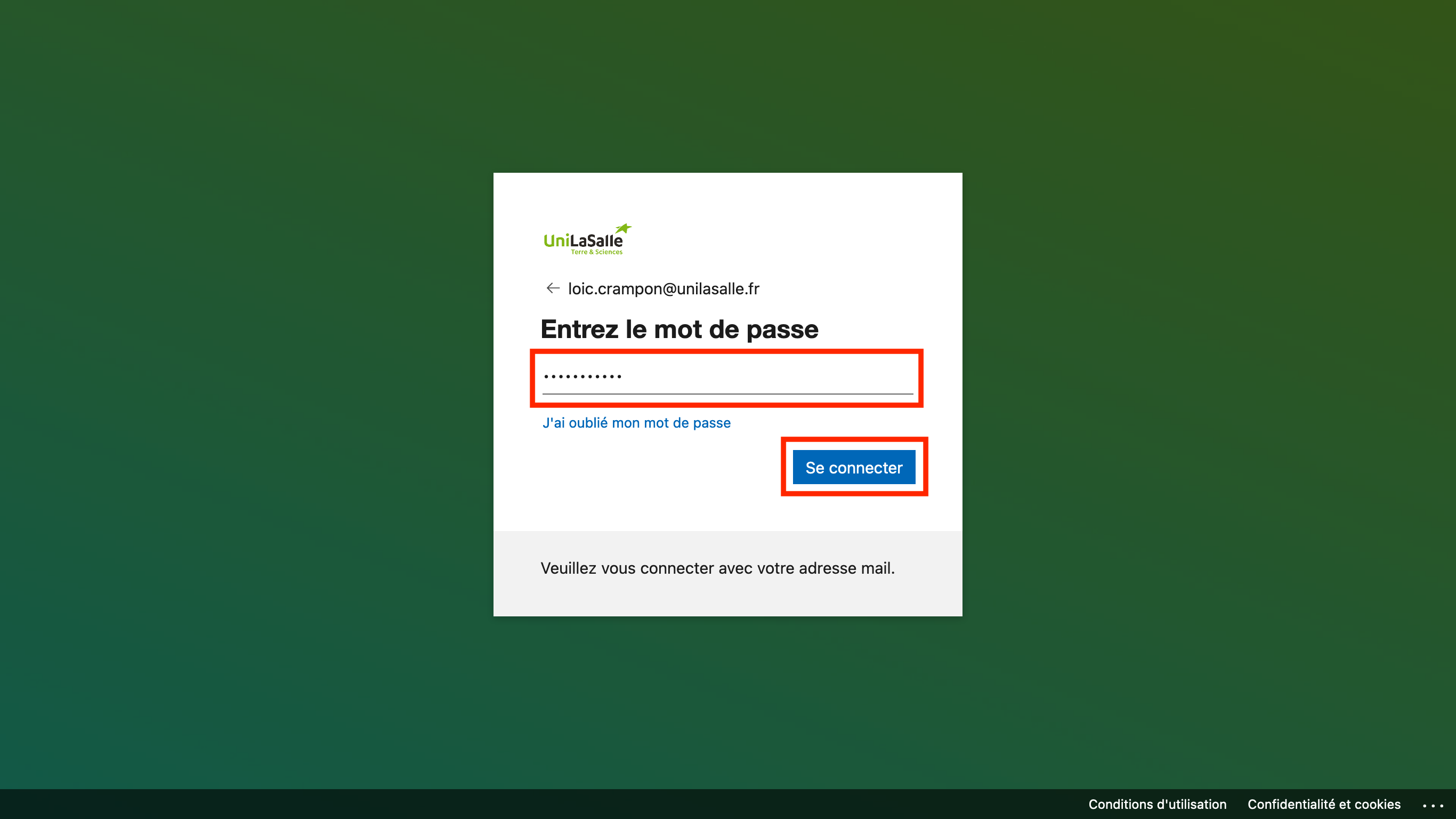
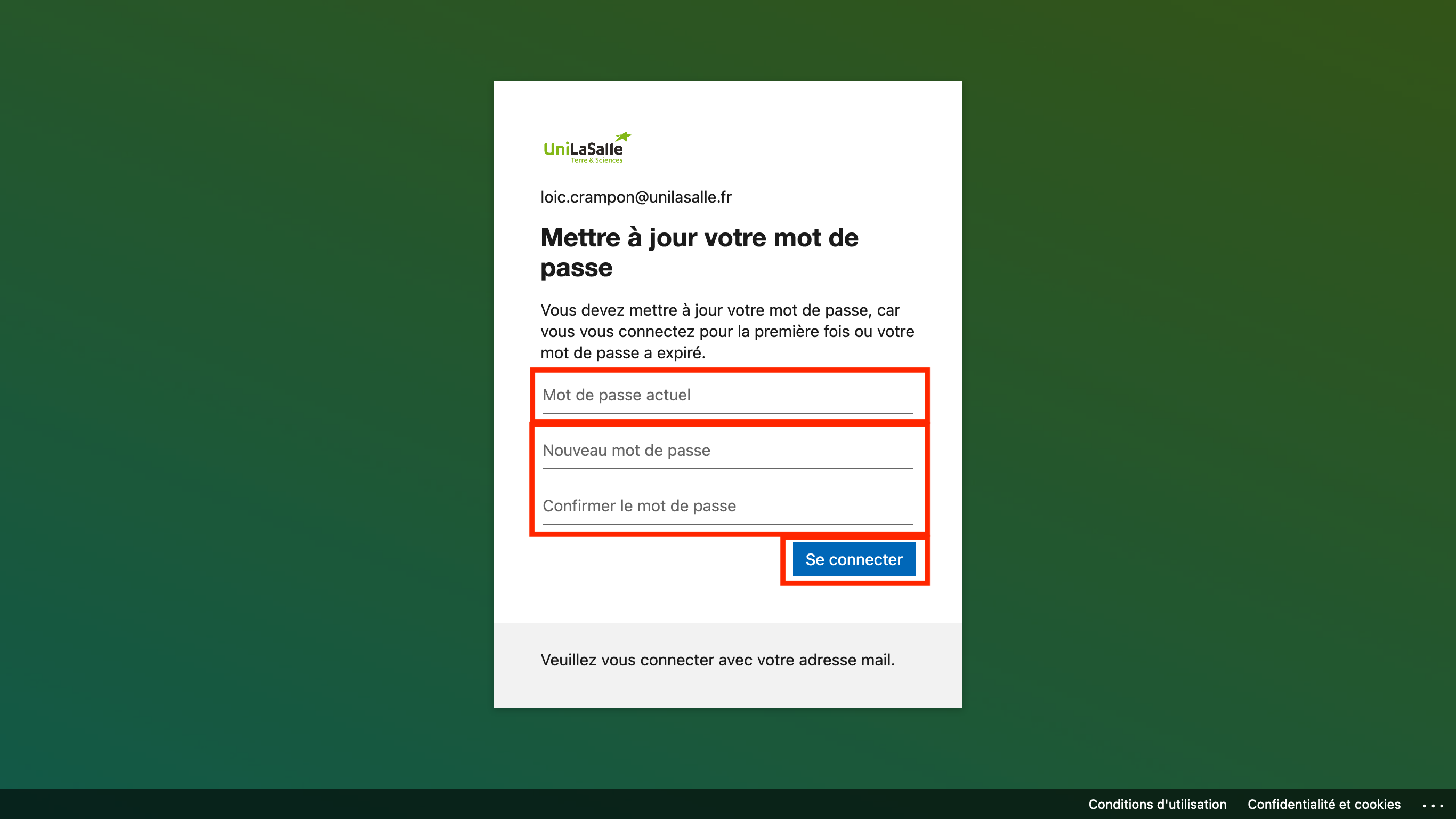
The next time you log in to Office 365 tools (https://portal.office.com, https://outlook.office.com, etc.), the system will simply ask you to set a new password:
After entering your user name
And enter your current password
The system asks you to set a new password
Will this new password be used on all UniLaSalle services?
Yes, except when logging on to your computer, as long as you are not connected to the campus network. But for all other tools, this new password will have to be used.
How complex is the password to be set?
8 characters with at least 1 number and 1 special character and no logical sequence of letters (e.g. part of your name, or "acdb" are not allowed). A simple way to define a complex password is to choose a mnemonic phrase (quote, song lyrics, etc., e.g. "With great power comes great responsibility! ") and transform this phrase by taking each first letter of the words or replacing some words with numbers (the above quote gives "W8PcGr! (the above quote is "W8PcGr!": 8 characters, at least 1 number and a special character, the constraint is respected).
Any other advice on passwords?
Yes, it is recommended to have a different password from your personal passwords (and even for your personal passwords, it is recommended to have a different password per service). Again, a simple way is to add the first letter of the service name to the beginning or end of your password. So your Amazon password becomes "W8PcGr!a", your Google password becomes "W8PcGr!g" and your UniLaSalle password becomes "W8PcGr!u".
I am staying on the campus of Beauvais, can my personal equipment connected to the network be affected?
No, the hackers were not able to move on the student network (wired or wireless), so your devices are not affected by the cyberattack that targeted our campuses. Nevertheless, the number of ransomware attacks has been exploding in recent weeks and days, so we advise you to :
- Update your antivirus software
- Be particularly vigilant to phishing emails, emails from unknown correspondents and attachments contained in these dubious emails (a simple Office document can contain a worm that can infect your system)
If you have any doubts about a potential infection on your Windows computer, you can perform a scan with your antivirus software and/or use the Safety Scanner provided by Microsoft and available by following this link : https://docs.microsoft.com/fr-fr/windows/security/threat-protection/intelligence/safety-scanner-download
On Beauvais, the contents of my J:/ drive have been copied to my OneDrive space. How do I access it?
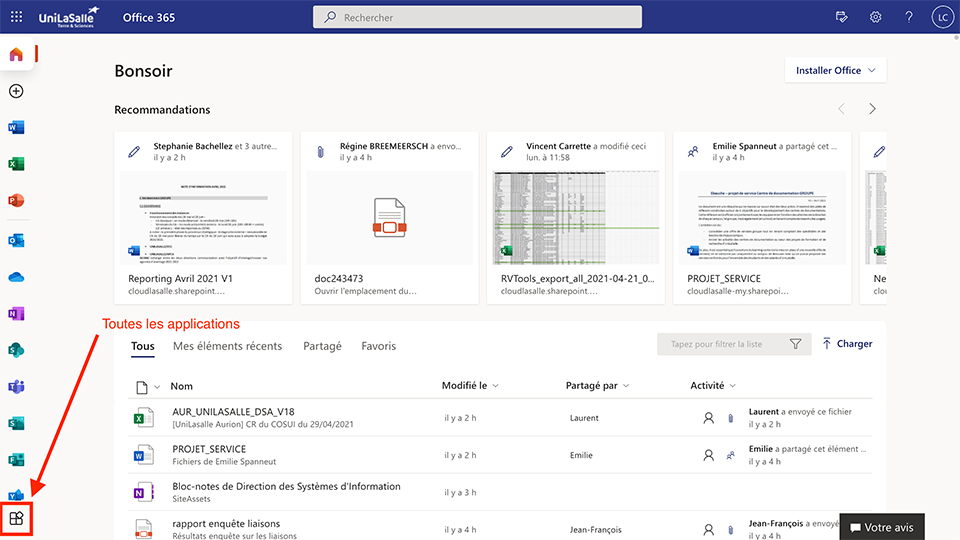
By connecting to your Office 365 portal https://portal.office.com with your UniLaSalle email and password and clicking on the "All applications" icon
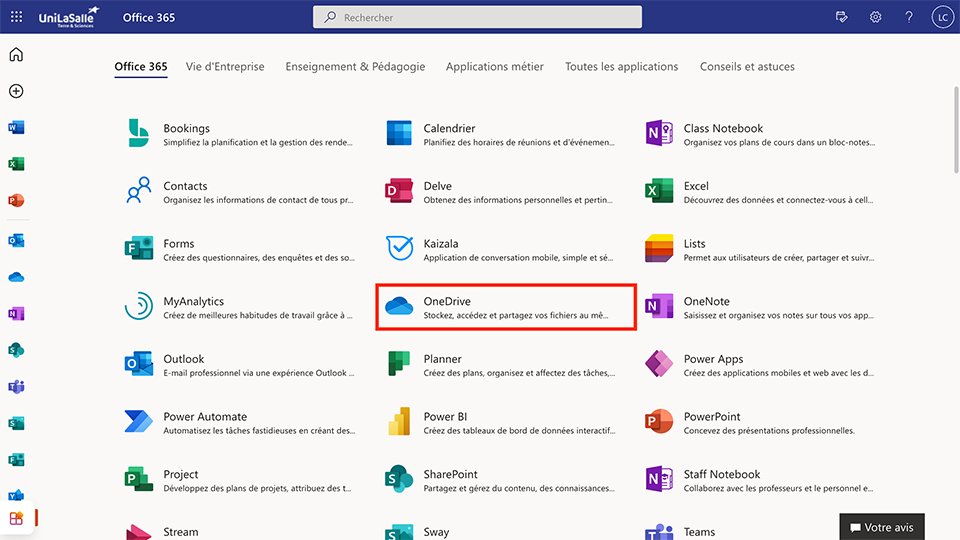
You will find a OneDrive icon. This will take you directly to your personal OneDrive space.
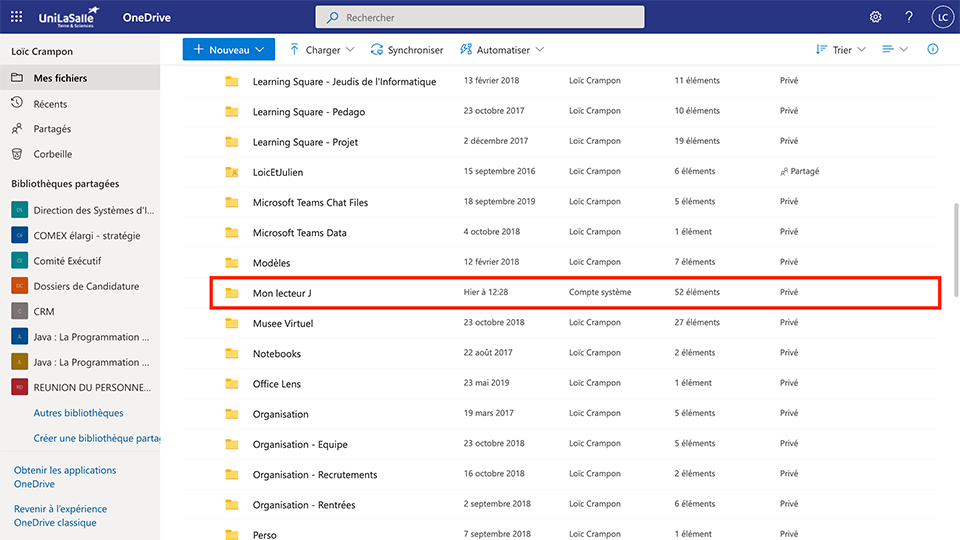
Dans lequel vous trouverez un répertoire intitulé « Mon disque J » qui reprend l’intégralité de vos données présentes sur le réseau.
So OneDrive will replace my personal disk space (historically available on the network)?
Yes, there are many advantages:
- you can find your documents from anywhere (a simple Internet connection and a browser);
- As with Teams, a history of changes to each document is kept: you can therefore go back in time and restore a previous version of a document;
- a deleted document can be recovered for 30 days in the OneDrive recycle bin; you have 1TB of data space (1000 times more than the default J:/ drive space);
- some documents can be edited directly from the web (with Office Online);
- you can easily share a document with one or more colleagues (internal or external).
But if I prefer to have the documents on my computer so I don't have to download them every time I need them, is OneDrive for me?
Yes, because there is an application on your computer that allows you to synchronise the contents of your OneDrive space on your computer. So any document modified/added/deleted in the synchronised folders on your computer will automatically be synchronised with your OneDrive space online.
Ok, I'm convinced, it looks really good. Are there any resources to learn more about OneDrive?
Yes, by following this link for written documentation and this link for video tutorials
Tools - Status
Below is a list (perhaps not yet fully comprehensive) of services and their status. This list will be completed as we progress.
| Tools | Status Amiens campus |
Status Beauvais campus |
Status Rennes campus |
Status Rouen campus |
Estimated date of return | More information |
| Agora | Partial | 30/04/2021 | Planning problems solved. | |||
| Bristol | OK | 28/04/2021 | ||||
| Claroline | OK | OK | OK | OK | ||
| La Ruche | OK | |||||
| Mobility-Online | OK | OK | OK | 28/04/2021 | ||
| Moodle | OK | OK | ||||
| MyUnilasalle | Stop | |||||
| Office 365 | OK | OK | OK | OK | ||
| Outlook | OK | OK | OK | OK | Ok via the web https://outlook.office.com | |
| Network disk | OK | Partial | Stop | Stop | 03/05/2021 | Network disk I:/, J:/, etc, etc... |
| Computer rooms | OK | Stop | Partial | |||
| Scola | OK | |||||
| Sphinx | OK | OK | OK | 30/04/2021 | ||
| Teams | OK | OK | OK | OK | Ok via the web https://portal.office.com | |
| TeDi | Stop | Stop | Stop | Stop | 10/05/2021 | |
| Public Wifi | OK | OK | OK |